Solutions
Three products, one platform.
Evoa Design for the trades designing the work. Evoa Omni for the whole project. Evoa Developer for owners comparing their options. All three run on the same building model.
For contractors, GCs and energy consultants
Evoa Design
Design every system. Send one proposal.
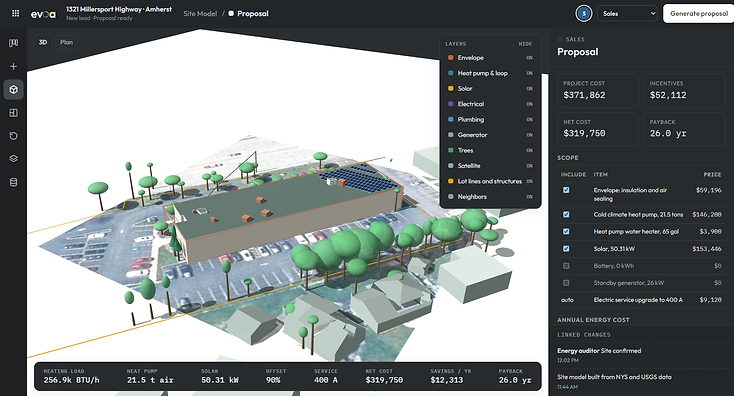
Design the envelope, the heating and cooling, geothermal, solar, storage, electrical and plumbing on the same building model. Every trade prices into one estimate, and the finished design turns into a proposal the customer can read and sign.
- Every trade designed on one building model
- Your own team and your partner firms on the same project
- One cost picture, with labor, equipment and subcontractors kept separate
- A branded proposal, ready the same day
For teams running the whole project
Evoa Omni
Everything EVOA does, on one project.
Omni brings the site inspection, the building model, every trade and the paperwork together. Walk the building with the Omni Scanner and the measured room sizes, envelope defects and panel capacity feed the same model the trades design on.
- Site inspection with the Omni Scanner
- Every module, from the address to the finished proposal
- Change one trade and the affected trades update
- A record of who changed what, on every version

For developers and property owners
Evoa Developer
Know the numbers before you commit.
Enter an address and compare the systems you are considering side by side, with the cost, the incentives and the payback on each one. Take the scenario you want and hand it to the trades on the project. Free to use.
- Start from an address, no drawings needed
- Compare scenarios side by side
- Cost, incentives and payback on each option
- Hand the chosen scenario to the trades

The core of the platform
The parts every project uses, from the address to the signed offer.
Every job in one place.
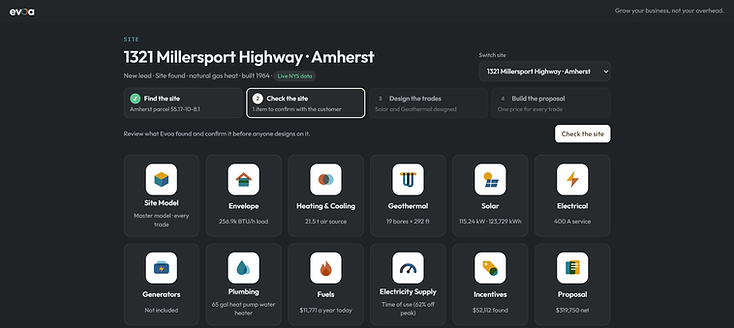
A project holds the address, the site model, the trades on the job, the estimates and the offer. Everyone working the job opens the same project, so nothing lives in a folder on one laptop.
Open the Projects moduleA building model built from the address.
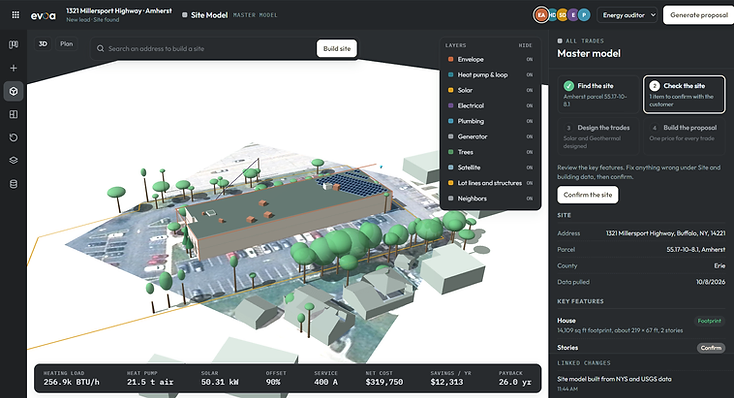
EVOA builds a site and building model from public data such as parcels, building footprints, LiDAR and weather, then calibrates it against the utility bills you upload.
Open the Site Model moduleRebates and credits, checked.
The incentives module gathers the federal, state and utility programs that apply to a job and shows what each one is worth.
Open the Incentives moduleOne price for the whole job.
The estimates module adds every trade on the project into one cost picture, with labor, equipment and subcontractor parts kept separate.
Open the Estimates moduleOne offer, ready the same day.
The proposal module turns the design and the estimate into a document the customer can read and sign.
Open the Proposal module
The numbers behind the offer.
The reports module produces the load, energy and savings reports that back up an offer.
Open the Reports moduleIn house teams and partner firms.
The team module keeps your own designers and your partner firms on the same project, with a record of who changed what.
Open the Team moduleWhere the numbers come from.
The data sources module lists every source behind a project, from public parcel and weather data to the bills and measurements you upload.
Open the Data Sources moduleThe trade modules
The trades on the job, each one designing on the same building model.
Reduce the load before you size equipment.
The envelope module models insulation, air sealing, windows and doors, and reports what the work does to heating and cooling loads.
Open the Envelope moduleEquipment sized from the real load.
The heating and cooling module sizes equipment from the calibrated loads in the model instead of a rule of thumb.
Open the HVAC moduleGround loops sized to the building.
The geothermal module sizes the ground loop and the heat pump together, using the loads from the model.
Open the Geothermal moduleProduction matched to the load.
The solar module lays out an array from the roof and the site model, then matches production to what the building actually uses.
Open the Solar moduleBatteries sized to the job.
The storage module sizes batteries for backup, peak shaving or self consumption, and shows how the choice changes the payback.
Open the Batteries moduleService, circuits and capacity.
The electrical module checks the service size and the panel, then lays out the circuits the other trades add to the job.
Open the Electrical moduleBackup sized to what matters.
The generators module sizes standby power for the circuits a customer wants to keep running, and prices the transfer equipment.
Open the Generators moduleWater heating and domestic water.
The plumbing module covers water heating and the domestic water work that comes with an energy upgrade.
Open the Plumbing modulePropane, natural gas and oil.
The fuels module tracks the fuels on the site, prices what stays and what goes, and models the running cost of each option.
Open the Fuels moduleRates, usage and what the meter says.
The electricity supply module reads the utility bills you upload and turns usage and rates into the numbers every other trade needs.
Open the Electricity Supply moduleRequest a demo
Want a walkthrough on your own project?
Tell us about your company and the work you sell, and we will set up a short call to walk through the platform with a project like yours.